Best Live Translation Extensions for Google Meet 2026
By MeetVoiceReviewed by MeetVoice EngineeringPublished Updated
This guide compares MeetVoice, Google Meet’s native translation features and Krisp Live Translation. Otter and Fireflies are discussed separately as meeting assistants; check each tool against the result you need.
How we evaluated these tools
Real-time speech translation has more dimensions than people realise when they start shopping. The six axes that matter for buyer decisions:
- Real-time vs post-call. Some tools translate during the meeting (everyone hears or sees the translation immediately); others produce a translated transcript after the call ends. Both are useful, but they are not interchangeable.
- Spoken translation vs text-only captions. Live captions let you read the translation; spoken translation adds a voice in your language, with the original speaker quieter in the background. Reading captions while watching a slide deck is harder than it sounds.
- Bidirectional. Does the tool translate both participants simultaneously, or only one direction? A one-way translator works for listening to a foreign speaker, but breaks down the moment you need to reply in your own language.
- Language pairs supported. A vendor saying “100+ languages” usually means transcription, not translation. Real translation pair counts are typically smaller.
- Audio routing. Local processing keeps audio on your device; vendor cloud routing sends meeting audio to the vendor’s servers. This matters for data residency policies.
- Pricing model. Subscription, one-time payment, free tier, enterprise access only — and which features are gated behind the higher tiers.
Comparison at a glance
| Tool | Real-time | Speech-to-speech voiceover | Bidirectional | Languages | Audio routing | Pricing |
|---|---|---|---|---|---|---|
| MeetVoice | Yes | Yes | Yes | 32 | Local app, speech recognition included | From €9/month — pricing |
| Google Meet — Translated captions | ✓ | — | — | ≈70, still rolling out | Business Standard and higher Workspace editions — Google Meet Help | |
| Google Speech Translation | ✓ · 90 min (Ultra: 8 h) | ✓ | ↔ | 63, any combination | Google Meet Help | |
| Krisp Live Translation | Yes | Yes | Yes | 60+ | Krisp cloud | Call Center AI application; translation pricing on request — krisp.ai/pricing |
| Otter.ai | No — live transcription only | No | n/a | 6 (transcription) | Otter cloud | Free / Pro $16.99 / Business $30 per user/month, billed monthly — otter.ai/pricing |
| Fireflies.ai | No — live transcription only | No | n/a | 100+ (transcription) | Fireflies cloud | Free / Pro $10 / Business $19 per seat/month, billed annually — fireflies.ai/pricing |
| Subtitle-only browser extensions | Yes | Some read the translation aloud to you only | No voice for the other side | Varies | Usually the vendor’s cloud | Often a few free minutes every month |
Prices and features checked against each vendor’s official pages on 2026-10-01; Google Speech Translation rechecked on 2026-10-29.
1. MeetVoice — best for real-time bidirectional spoken translation
MeetVoice is a Chrome extension paired with a small desktop app that runs locally on Windows or macOS. The extension captures the meeting audio in your tab and passes it to the desktop app, which runs the processing server on your computer: the audio goes through built-in speech recognition, then through a translation model, and the translation of incoming speech comes back to you as on-screen subtitles in your tab and as synthesised speech in your language. Voicing your own speech for the other side is optional and off by default — you turn it on in the extension. While the translated voice plays, the original speaker’s audio is automatically lowered (audio ducking): it stays audible, just quieter, so the translation is easier to hear.
Strengths. Spoken translation with voiceover playback is the headline feature — most “Google Meet translation” tools stop at text captions. MeetVoice translates both directions: when you speak English and your partner speaks German, you read and hear incoming speech in English, and your partner hears your words as a German voice once you turn on translation of your speech in the extension (it is off by default). Subtitles are drawn only in your own tab, so your partner does not see them unless you share that tab or your screen. It supports 32 languages (EN/DE/RU/UK + ES/PT/FR/IT + PL/NL/TR/JA/KO + CS/SK/HU/RO/BG + EL/SV/NB/FI/DA + HI/ZH/VI + HR/SR/SL/LT/LV/ET). Speech recognition is included in every plan — no API key needed; audio is processed in transit through the MeetVoice speech recognition relay and never stored. The extension keeps a per-call transcript in your browser — the other participants’ speech, plus yours when translation of your speech is on — with participant names read from the Meet interface when they can be determined, exportable as PDF, SRT, or TXT after the call. Up to 50 meetings are kept in history.
Limitations. The extension is built for Google Chrome and published only in the Chrome Web Store; there is no Firefox or Safari version. Requires installing both the extension and the desktop app, which is more friction than a pure browser extension. As a newer product, the community is smaller than Otter’s; expect occasional rough edges in less common language pairs.
Best for. Cross-language sales calls, EN↔JA/KO/RU technical interviews, and international standups where participants need to understand incoming speech in their own language. Use multilingual mode for incoming speech across 2–4 expected languages; use regular language-pair mode when your own microphone needs to be translated for someone else. Multilingual mode (2–4 languages from a set of ten) uses the same included recognition as language-pair mode.
If you want a deeper dive on how real-time bidirectional translation works end to end, we wrote a dedicated post on it.
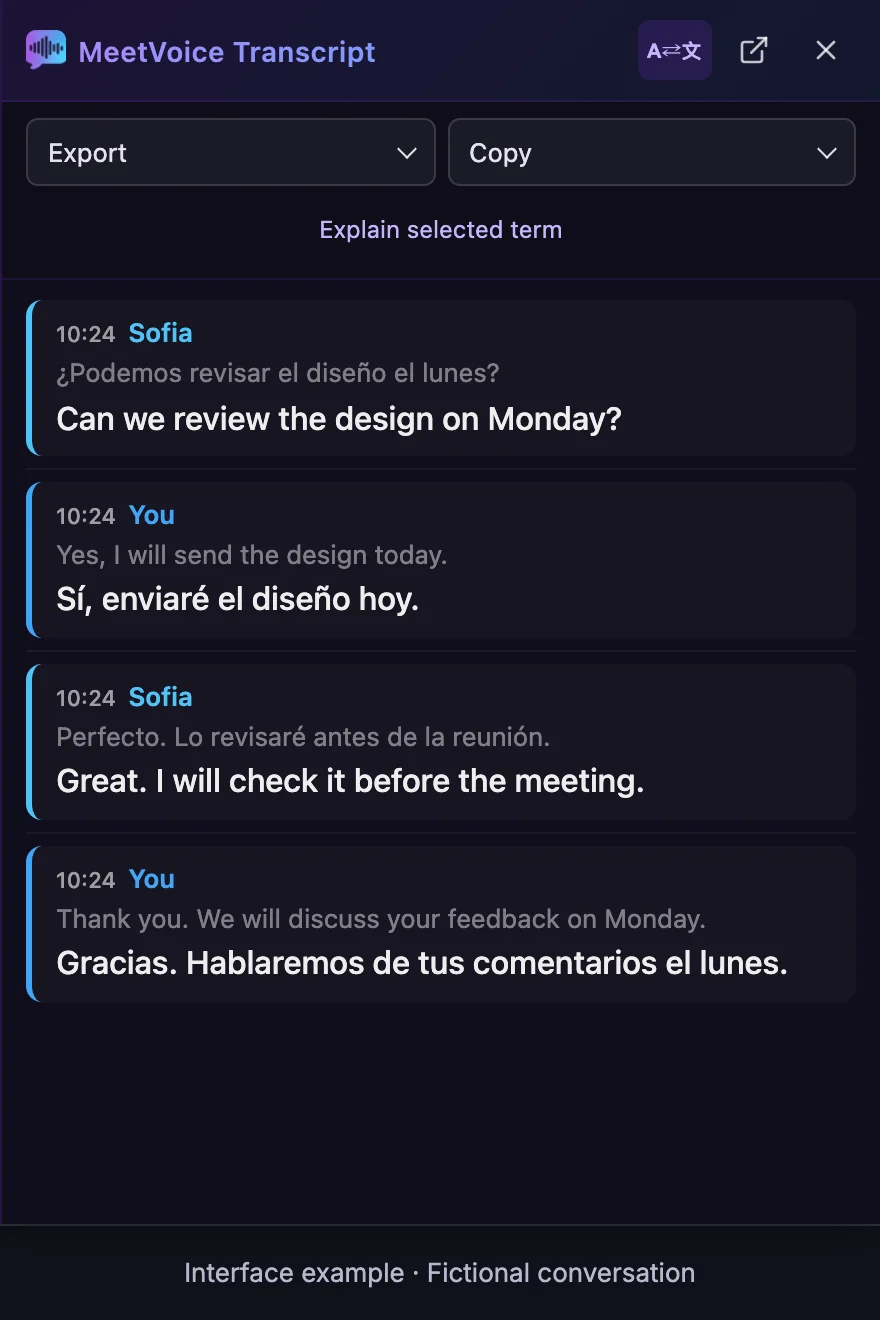
Read the full transcript instead
Sofia
What was said: ¿Podemos revisar el diseño el lunes?
Translation: Can we review the design on Monday?
You
What was said: Yes, I will send the design today.
Translation: Sí, enviaré el diseño hoy.
Sofia
What was said: Perfecto. Lo revisaré antes de la reunión.
Translation: Great. I will check it before the meeting.
You
What was said: Thank you. We will discuss your feedback on Monday.
Translation: Gracias. Hablaremos de tus comentarios el lunes.
2. Google Meet built-in translated captions / Speech Translation
Strengths. Standard captions transcribe speech; translated captions display translated text on eligible plans. Both are text features. Google Help lists around 70 languages for translated captions, included in Business Standard and higher Workspace editions; translated captions are still rolling out. Speech Translation is a separate feature for translated audio.
Google · 2026-10-29
Limitations. On 22 October 2026 Google expanded it to 63 languages: Meet detects the spoken language, and participants can translate between any combination of supported languages in the same meeting; it reached Rapid Release Workspace domains from 22 October, and Scheduled Release domains get it from 2 November 2026, which can take up to 15 days. Each participant turns it on for themselves, and most eligible plans allow up to 90 minutes per meeting (Google AI Ultra, up to 8 hours). Access depends on an eligible plan, administrator settings, supported devices and participants allowing their voices to be translated. Speech Translation also comes with personal Google AI Pro and Google AI Ultra subscriptions; availability in a meeting also depends on the host’s account and admin settings. Speech Translation is not available in recordings or live streams.
Where meeting recording is available, Record captions can include captions in the recording. Turning on captions alone does not automatically create a bilingual PDF, SRT or TXT export; availability and permissions depend on the plan and settings.
Speech Translation · Record captions · Google Workspace Updates · Speech Translation in 63 languages
Best for. Try Speech Translation first when the meeting host’s plan includes it, everyone who needs a translation can turn it on, and 90 minutes is enough. Compare MeetVoice when the meeting host has no eligible plan (a free personal Google account or Business Starter, for example), you need longer meetings, want the other side to hear your translated voice without setting anything up, or need bilingual transcript exports. MeetVoice vs Google Meet built-in captions
3. Krisp Live Translation
Krisp is best known as a noise-suppression tool, and the company has launched real-time bidirectional spoken translation in 60+ languages. The mechanics are similar to MeetVoice — speech in, translated speech out — but the packaging is different.
Strengths. When available, the technology covers a wider language footprint (60+) than MeetVoice’s 32, and bundles noise cancellation. Krisp’s enterprise-grade infrastructure has been deployed at large call-center operations.
Limitations. Live Translation is not part of Krisp’s Meeting AI plans (Core $16 and Advanced $30 per user per month, billed monthly). Voice translation sits in Krisp’s Call Center AI products: it is an add-on to CC Core ($15 per agent per month billed annually, before the add-on) and is included in CC Advanced, which is priced on request. Both are aimed at customer-support and outbound-sales operations rather than ad-hoc Google Meet calls, so for an individual Meet user getting Live Translation through Krisp typically means a sales conversation — not the friction-free experience the name might suggest. Krisp also sells a self-serve Voice Translation API for developers; that is a building block for your own product, not a ready app for Google Meet calls. Audio is routed through Krisp’s cloud (rather than locally), so data residency policies matter.
Best for. Call-center operations and large customer-support teams that need translation at scale and have the procurement bandwidth to set it up. Not currently the right fit for an individual freelancer or a small team wanting a quick install on Google Meet. See krisp.ai for current details.
Subtitle-only browser extensions
Several Chrome extensions show translated subtitles of a Google Meet call only to you. Some also read the translation aloud in your browser’s voice, and many include a few free minutes every month, which makes them an inexpensive way to follow a call you mostly listen to. What they don’t do is voice your words for the other participant in their language: if you need to reply in your own language and be understood, you need spoken translation in both directions.
What about Otter, Fireflies, and other meeting transcribers?
Otter and Fireflies appear in almost every search for “Google Meet translation” or “best Google Meet AI tools,” so it’s worth being explicit about what they are. They are meeting assistants — live transcription during the call and summaries afterwards — not live translators. They join a call, transcribe the audio, and produce a summary plus searchable transcript afterwards. Translation in their products applies to the transcript — not to the live conversation.
Otter (otter.ai) transcribes meetings in six languages (English, Spanish, French, German, Japanese, Chinese) and is widely loved for the quality of its AI summaries on English-language calls. It does not translate spoken audio during the meeting. Pricing: Free / Pro $16.99 per month / Business $30 per month.
Fireflies (fireflies.ai) transcribes in 100+ languages and integrates more deeply with CRM and Slack workflows, which makes it useful for sales operations that want every call captured and pushed downstream. Translation is part of its post-meeting summaries. Pricing: Free / Pro from $10 per month / Business from $19 per month (annual billing; verified 2026-10-01).
Both are excellent at what they do, but neither helps a Russian speaker and a Spanish speaker understand each other live. If the search result that landed you on “best Google Meet translation extensions” was hoping for Otter or Fireflies to do live speech translation — they don’t.
Which one should you choose?
A short decision tree:
- You need real-time spoken translation, both directions, on Google Meet without enterprise sales calls → MeetVoice.
- Try Google’s Speech Translation first when the host’s plan includes it and the time you need it for fits its limit. Compare MeetVoice when the host has no eligible plan (a free personal Google account or Business Starter, for example), you want the other side to hear your translated voice without setting anything up, or need bilingual transcript exports. Google Meet Help
- You run a call-center or support operation needing 60+ languages and have procurement bandwidth → Krisp Live Translation (Call Center AI tier, contact sales).
- You only follow calls as a listener and want a free monthly allowance → a subtitle-only browser extension.
- You want a transcript and AI summary of an English-language meeting → Otter.
- You need transcripts pushed into CRM/Slack workflows after the call → Fireflies.
For most readers who landed on this article expecting to translate ad-hoc Google Meet calls without enterprise procurement, MeetVoice is the closest fit. The 30-minute free trial requires no credit card, so the cost of trying it on one real meeting is zero — and that’s usually the only way to know whether real-time spoken translation changes the way your international calls actually feel.
Download MeetVoice for Windows or macOS and translate your first Google Meet call live, in your language, without typing a word. If you’re ready to go beyond the trial, see pricing plans.
Frequently asked questions
- Does Google Meet have built-in real-time translation?
- Standard captions transcribe speech; translated captions display translated text on eligible plans. Both are text features. Speech Translation is a separate feature for translated audio. Google announced general availability of Speech Translation on 4 February 2026. On 22 October 2026 Google expanded it to 63 languages: Meet detects the spoken language, and participants can translate between any combination of supported languages in the same meeting; it reached Rapid Release Workspace domains from 22 October, and Scheduled Release domains get it from 2 November 2026, which can take up to 15 days. Each participant turns it on for themselves, and most eligible plans allow up to 90 minutes per meeting (Google AI Ultra, up to 8 hours). Access depends on an eligible plan, administrator settings, supported devices and participants allowing their voices to be translated. Speech Translation is not available in recordings or live streams.
- Is there a free Google Meet translator?
- The closest option at no extra cost is Google Meet's own translated captions, included in your Workspace subscription if your Google Workspace edition is on Google's list (Business Standard and higher). For real spoken translation, MeetVoice offers a 30-minute free trial without a credit card. Otter and Fireflies have free tiers and transcribe calls live, but they don't translate the conversation live. Krisp's Live Translation is not in its free tier or its Meeting AI plans: it is an add-on to Krisp's Call Center AI CC Core plan and included in CC Advanced.
- How much does MeetVoice cost after the trial?
- There is no free plan. After the one-time 30-minute trial, plans cost €9 (Starter, 5 hours of translation), €19 (Pro, 20 hours) or €39 (Max, 30 hours with studio voices) per month; hours renew every month. AI meeting summaries and term explanations aren't included in the trial.
- How can I test MeetVoice before paying?
- Download the desktop app for Windows or for macOS 13 or later on Apple Silicon, add the Chrome extension from the Chrome Web Store and start the free trial on first launch: 30 minutes of use, no payment card. Try it on a real call with your own language pair, speakers and vocabulary — that tells you more than any review.
- Which extension is most accurate for English-German or English-Russian meetings?
- No tool is perfect: results depend on microphone quality, accents, crosstalk and specialist vocabulary as much as on the software. MeetVoice translates English–German and English–Russian in both directions; to see how well it handles your speakers, test the 30-minute trial on a real call before committing — that is the only reliable benchmark.
- Does MeetVoice support Russian, Czech and other languages?
- Yes. MeetVoice translates between any two of its 32 languages in both directions, so pairs such as English–Russian or Czech–English work, and Czech speech is translated in language-pair mode. Multilingual mode, which handles 2–4 incoming languages at once, recognises incoming speech in ten of them — English, German, Russian, Spanish, Portuguese, French, Italian, Japanese, Dutch and Hindi — and translates it into your language, which can be any of the 32, Czech included.
- Does it work with a personal Google account or a company Google Workspace?
- MeetVoice doesn't check what kind of Google account you use. It captures the audio of your Google Meet tab in Chrome on your own computer rather than joining the call as a bot, so the setup is the same for personal and Workspace accounts, Business Starter included. Your company's IT can still block Chrome extensions or app installs on managed devices. On Google's side, translated captions are listed for Business Standard, Business Plus, Enterprise Standard, Enterprise Plus and Google AI Pro for Education — not Business Starter or personal accounts; Speech Translation also comes with personal Google AI Pro and Google AI Ultra subscriptions, and whether it can be turned on also depends on the meeting host's account and admin settings.
- Can other participants see my subtitles?
- No. MeetVoice draws the subtitles in your own Chrome tab, so other participants don't see them — unless you share that tab or your screen, which shares the overlay too. They hear your speech as a translated voice only if you turn on translation of your speech in the extension; it is off by default.
- Does MeetVoice work in Firefox or Safari?
- No. The MeetVoice extension is built for Google Chrome and published only in the Chrome Web Store; there is no Firefox or Safari version. It also needs the MeetVoice desktop app, available for Windows and for macOS 13 or later on Apple Silicon.
- Can I translate Google Meet on Mac?
- Yes. MeetVoice ships native macOS builds for Apple Silicon (M1 and newer) running macOS 13 or later, paired with the Chrome extension — Intel Macs aren't supported. Krisp also runs on macOS. Google Meet's translated captions work in Meet on a computer, Mac included, on an eligible Google Workspace edition. Otter and Fireflies are platform-independent because they don't process audio locally — they join meetings via the cloud.
- Do I need to install anything?
- For MeetVoice yes — both the Chrome extension and a small desktop app that runs locally to handle audio. Krisp's Live Translation requires their desktop app plus enterprise setup. Google Meet's translated captions need no install. Otter and Fireflies use browser-based bots that join the call as participants — no local install, but they need calendar/bot permissions and run on the vendors' cloud.
Desktop app + Chrome extension for Google Meet
Multilingual meetings on Google Meet
in real time
30-min trial • No credit card • Audio not stored • Full control
Related guides
Read a Google Meet call in your language while it is happening
Near-real-time subtitles over your Google Meet window in 32 languages, plus an optional spoken translation of your replies. 30-minute free trial.
Keep both languages of a Google Meet call, side by side
Keep the spoken line and its translation side by side after a Google Meet call, then export both languages as PDF, SRT or plain text.
Read also
Google Meet Translated Captions vs MeetVoice (2026)
Google Meet translated captions and Speech Translation in 2026: languages, eligible plans and limits checked against Google Help, and when MeetVoice fits.
Google Meet Live Translation: How to Translate Calls
Translate Google Meet calls live: subtitles in your language and, if you want, your voice translated for the other side. 32 languages, 30-min free trial.
Set Up MeetVoice in 2 Minutes: Quick Start Guide
A step-by-step guide to installing and setting up the MeetVoice extension for real-time translation on Google Meet, ready in about two minutes.